Suno Studio 2.0: MIDI, a Chat Bar, and Custom Plugins Land in the Browser-Based DAW
Between Real Craft and AI Generation: How Much Suno Is Actually in Your Music?

 1,6 / 5,0 |
Suno Studio 2.0: MIDI, a Chat Bar, and Custom Plugins Land in the Browser-Based DAW · Source: Suno

Suno just rolled out Suno Studio 2.0, a significant update to its browser-based DAW. The new version brings genuine MIDI support, a chat bar for collaborating with the AI, upgraded stem separation, custom effect plugins, and automation. What started as an AI music generator is becoming a comprehensive production tool, at least in terms of ambition. But would you like to produce music like this?
Suno Studio 2.0: Everything on MIDI, the Chat Bar, Stem Separation, and the New Plugin Features
MIDI: The Most Requested Feature Finally Lands
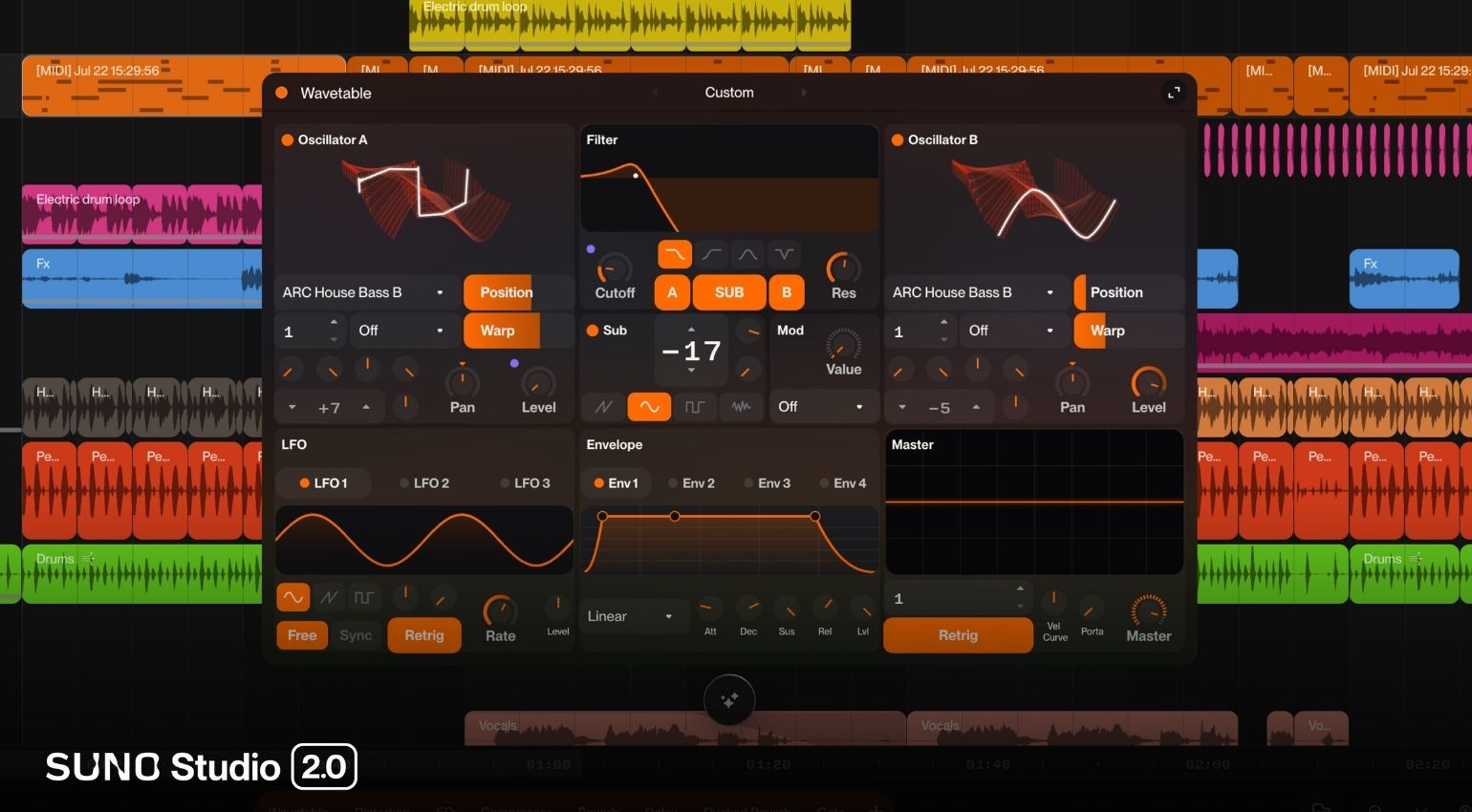
According to Suno, MIDI was the single most requested feature for Studio, and now it’s here. You can import, record, and edit MIDI directly on the timeline. There’s also a new wavetable synthesizer for creating your own sounds. One thing that is unique to Studio is that: MIDI clips can work as prompts for new audio generation. For example, you can play a melody, and the AI will build off of it. No MIDI controller? You can play notes straight from your regular keyboard, too.
Chat Bar: Talking to Your DAW Like a Bandmate
The new chat bar (currently in beta) works like talking to a regular member of your band. You can ask it to build instruments and vocals from scratch, or work with it on designing your own plugins. Suno says the chat bar actually understands music production, even session cleanup can get handled through chat.
Improved Stem Separation and New Audio Effects
Suno Studio 2.0 comes with an updated stem separation tool that, according to Suno, provides high-quality audio fidelity when separating individual tracks. This feature allows you to import audio from outside Suno, split it into stems, and rearrange everything from scratch inside Studio.
In addition to factory effects like sidechain compression and convolution reverb, you can now build your own plugins from the ground up through the chat bar, essentially vibe-coding your own effects. Creating new plugins won’t cost credits at launch, though Suno says a credit structure for that might show up down the line.
Suno Studio 2.0: Automation and Unlimited Export for Premier Subscribers
Suno Studio 2.0 introduces real automation for the first time. Track and plugin parameters can be adjusted over time by drawing automation curves, so you can develop a complete mix without ever leaving Studio. Premier subscribers can export high-resolution multitracks and stems (32-bit/48 kHz) without any restrictions.
My Take: Does Music Actually Need a Chat Partner?
Some of these features sound really useful. In particular, MIDI support and improved stem separation feel like real, practical additions. Still, I can’t shake my basic skepticism. A chat bar that whips up instruments, vocals, and entire plugins on command shifts the actual creative work away from playing music and toward typing out instructions instead. Whether this process is really the same as playing a line on a keyboard or tracking it with a mic is worth questioning.
Interestingly, this exact tension is heating up legally and financially right now, too. Suno just closed a major licensing deal with BMG, while GEMA scored a win at the Munich Regional Court that ruled unlicensed AI music training illegal. Suno is operating on two fronts: negotiating licensing deals and adding classic production tools to Studio to bring it closer to real musicianship. Meanwhile, the underlying question of whether its AI training is legal remains unresolved.
For me, it comes down to this: Does Studio 2.0 actually turn into a tool that supports genuine craft, the way a good synth or a well-designed plugin does? Or will the real creative work continue to drift away from playing music and toward crafting a clever prompt? Both answers seem plausible, and the honest answer probably depends on the user. I’m going back into my studio to jam with actual instruments (instead of prompting anything).
Bottom Line
With MIDI support, a chat bar, and the ability to build your own plugins, this update transforms Suno Studio into a considerably more serious tool for the entire production process, not just a front end for AI-generated stems. The MIDI integration as a prompt source for new generations stands out especially as a clever bridge between traditional musicianship and generative AI. Whether Studio will establish itself as a genuine DAW alternative or remain a symptom of the current shift in music production remains to be seen.
Price and Availability
Suno Studio 2.0 is available now exclusively for Suno Premier subscribers, with the Premier plan running $24 a month.
More Information

This might also interest you


One response to “Suno Studio 2.0: MIDI, a Chat Bar, and Custom Plugins Land in the Browser-Based DAW”
Suno and AI do not belong in art and music. Stop pushing this.