5 of the Best Saturation Plugins: The Coloring and the Shaping
Saturation processors for adding flavor to your mixes.

 1,0 / 5,0 |


We explore some of the best saturation plugins for adding harmonic color and texture to different areas of your mix in any style of music.
In this Article:
Saturation is both a creative and functional tool that can be applied in any stage of the music production process, from recording to mixing and mastering. Originally, saturation came from different analog circuit components like transistors, tubes, and transformers, as well as the process of recording to magnetic tape.
However, with analog modeling technology, we are able to harness these sounds in a DAW to generate even and odd harmonic overtones and add gentle peak shaping similar to soft-knee compression. The reason saturation is so popular today is because it sounds so natural, even when it’s applied in large amounts, enhancing the sound without changing it completely.
The Best Saturation Plugins: Softube Saturation Knob
Softube Saturation Knob is a completely free plugin with a simple single-knob interface that lets you learn about saturation without opening your wallet. While the main control determines the amount of saturation, there are also three different processing modes that target different areas of the spectrum for various applications.
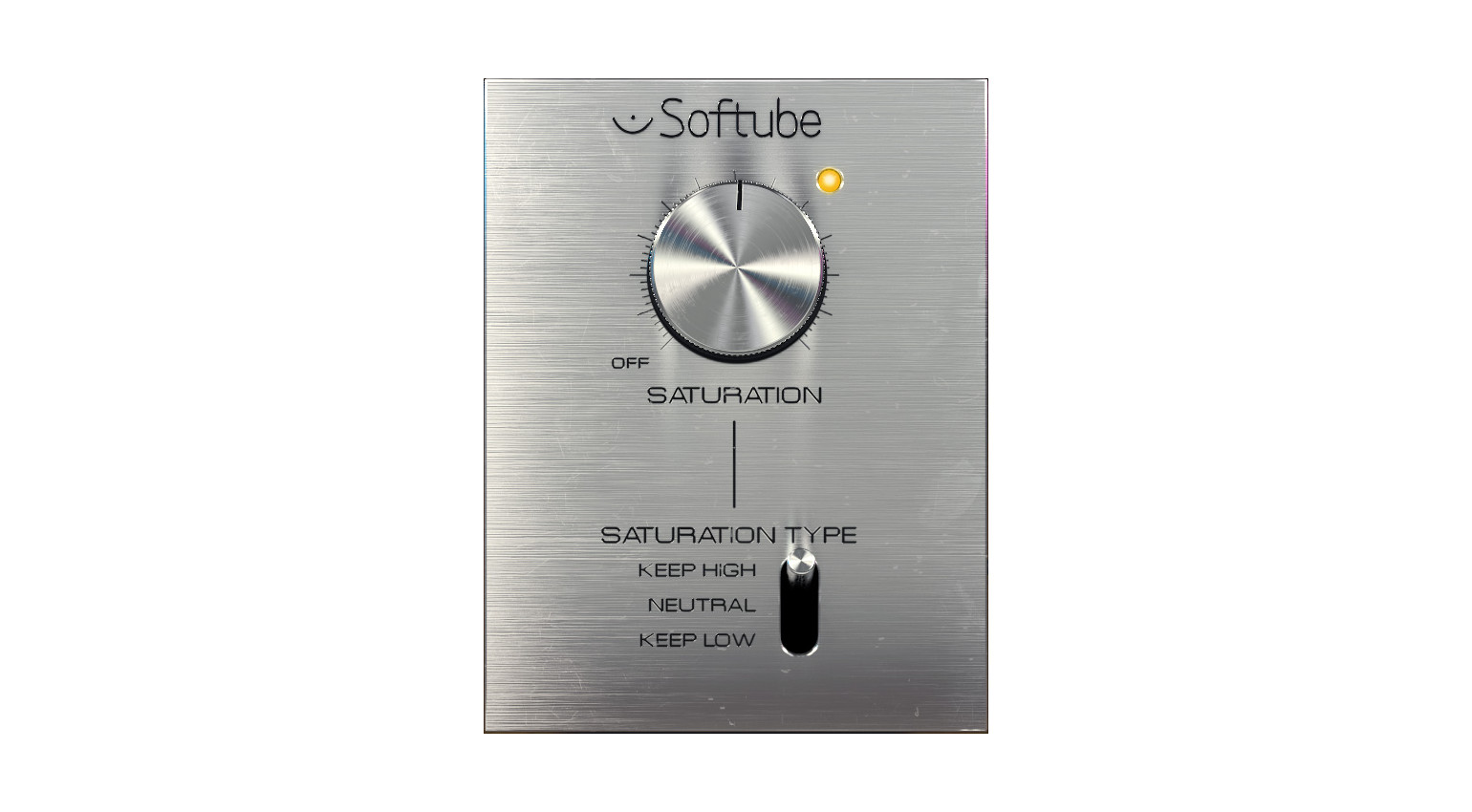
With Neutral, the saturation is applied evenly over the whole frequency range, while Keep High preserves high-frequency content and only the range below around 2.5 to 3 kHz is processed. Meanwhile, Keep Low does the exact opposite of this, preserving low frequencies below around 150 to 200 Hz. If you’re wondering why the crossover points aren’t exact, there’s a good reason for this.
Because the processing is analog-modeled, the circuit behavior is dynamic, so the filter’s position may vary according to the character of the input signal and how hard you’re driving the saturation. Overall, the Saturation Knob is a simple but effective processor that will help you get a feel for which areas of each sound like saturation and which areas don’t.
The Best Saturation Plugins: Wavesfactory Spectre
With Spectre, Wavesfactory went in a completely different direction, creating a multiband saturation plugin that looks more like a parametric EQ. Of course, the reason for this is that an EQ lets you target different areas of the spectrum more precisely, and it gives you a complete overview of all the active processing going on.
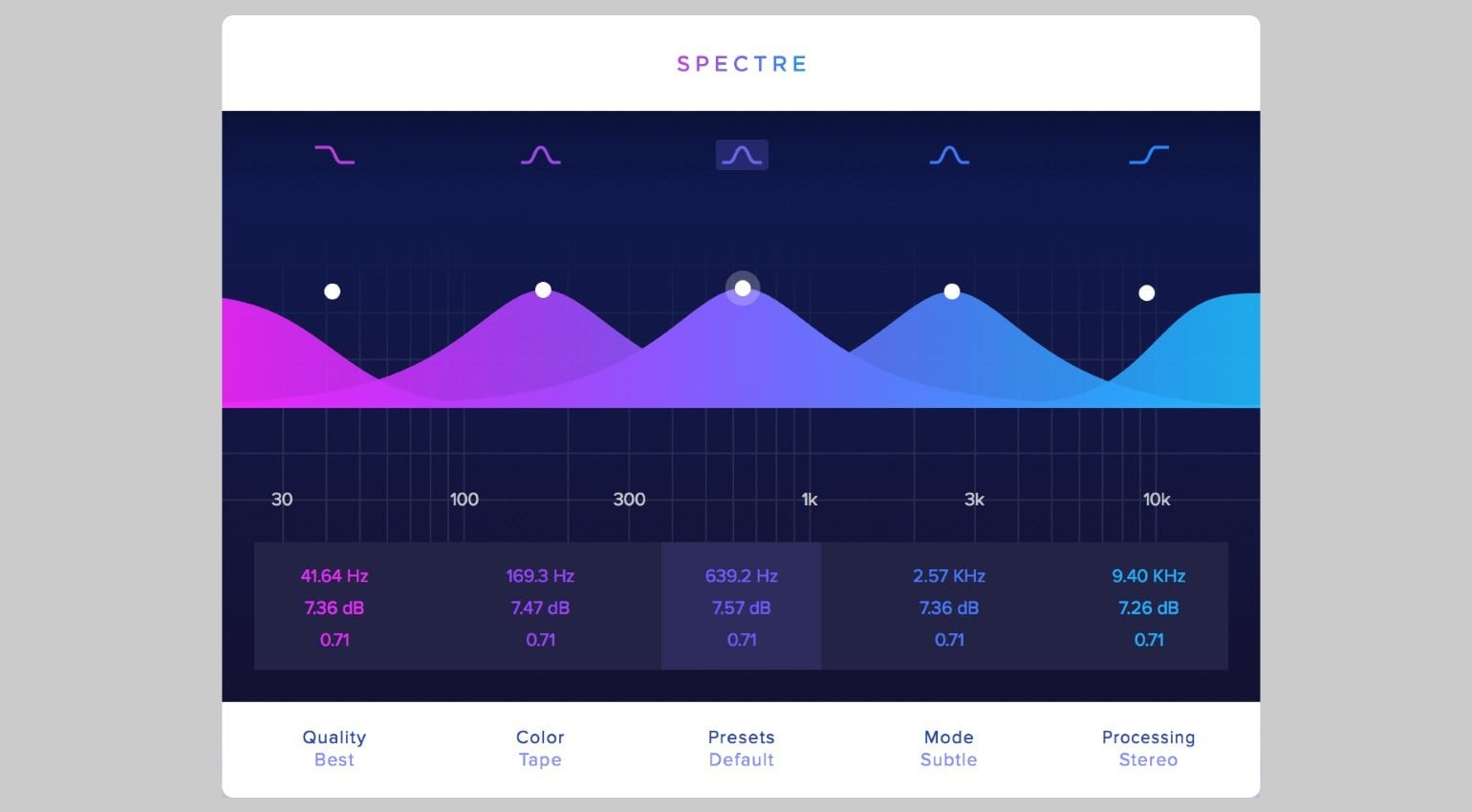
The key to Spectre’s design is that it works as a boost-only EQ across its five bands, and only the additional part of the signal is then processed with a selection of 10 saturation types, including tube, solid state, clipping, quantization, and rectifier algorithms. While Spectre doesn’t allow you to make corrective cuts like an EQ, the de-emphasis feature works by proportionally pulling back the gain at the boost point.
This provides a safeguard for introducing harmonics without adding loads of extra gain that can confuse your ears within the greater context of your mix. Overall, Spectre is a powerful mixing tool that lets you use saturation in a controlled way, applying different processing types across the lows, mids, and highs, and even targeting the mid and side channels.

The Best Saturation Plugins: FabFilter Saturn
You can always trust FabFilter to give any type of processor its own unique spin, and Saturn is no exception. With a diverse range of 28 saturation and distortion modes, Saturn gives you access to transformer, tube, and tape-modeled saturation, as well as exciting creative tools like amp circuits, rectifiers, and digital bit crushing for texture.

With Saturn’s multiband engine, you can split the processing across six adjustable bands with variable slope controls. This allows you to select a different saturation type for each part of the frequency range, and mid-side mode lets you control how much mid or side processing you want to apply to each band. To ensure that the signal retains integrity, there is a Linear Phase mode and oversampling.
Meanwhile, Saturn’s secret weapon is its extensive modulation matrix with a drag-and-drop routing interface. This gives you access to 16-step XLFOs, envelope followers and generators, as well as XY controllers for shaping the different processing bands texturally and even rhythmically. Overall, with its synthesis-like approach, Saturn is a unique processor with enormous creative potential.


The Best Saturation Plugins: Soundtoys Decapitator
By far one of the industry’s most popular saturation plugins, Decapitator is a simple processor that combines five different carefully modeled analog saturation types. With the “A” button, you can access the tube preamp from the Ampex 350 tape machine for a smoothly driven sound. Next, the “E” button gives you the legendary EMI TG Channel with its characteristically rich sound.
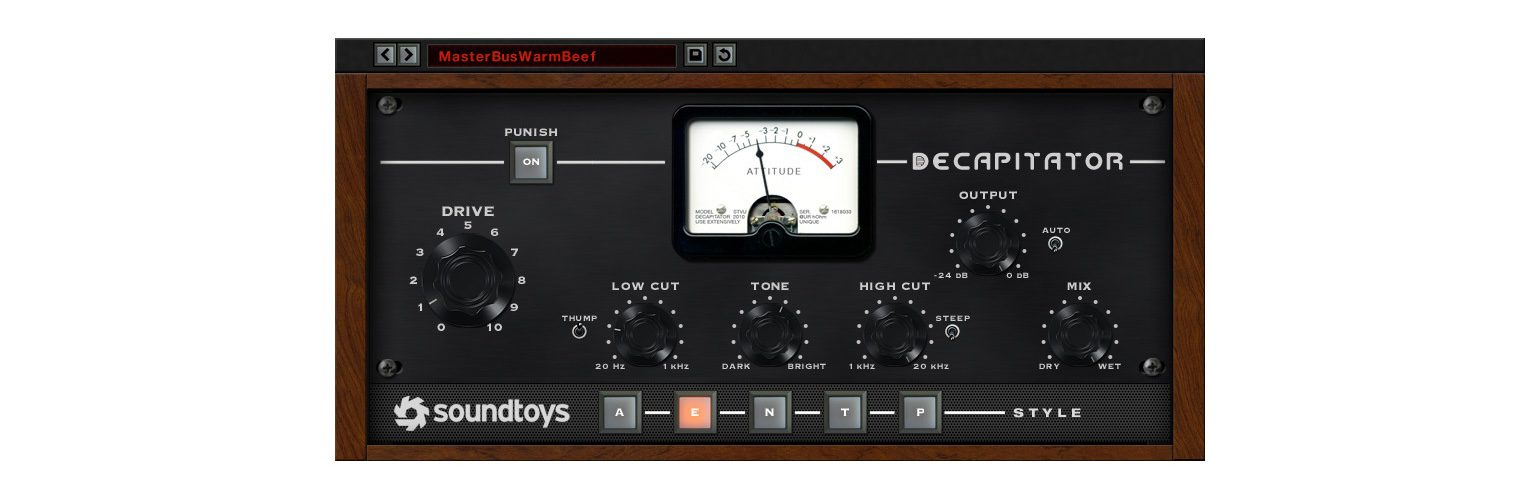
The setting called “N” is modeled on the rare Neve 1057 germanium transistor-based channel strip with its classic textured sound. Then, the last two settings are modeled on the Thermionic Culture Vulture tube saturator. While “T” gives you the even-order triode mode for warmth, “P” is the more aggressive setting with odd harmonics for added bite.
Although it’s only got a few controls, Decapitator is cleverly designed with a low-cut filter before the saturation stage and a high-cut filter after it, so you can really control how sounds sit in the mix. What’s more, the Punish button pushes an additional 20 dB of gain into the circuit when you need that screaming, “out-of-control” sound.

The Best Saturation Plugins: Soundtheory Kraftur
The British developer Soundtheory takes a unique approach to saturation and soft-clipping with Kraftur, which is a high-end multiband processor capable of intensifying your mix bus with perceived loudness, while preserving transients. When you buy the Kraftur plugin, you also get Kraftur Focus, which is designed for parallel processing without any phase issues.
Rather than using a conventional mix control, Kraftur uses a vector control to blend different amounts from three separate signals, including the original dry signal, the broadband processed signal, and the multiband split signal. This multiband processing engine divides the signal into three parts with its variable crossovers that are also phase-coherent.
Meanwhile, you can adjust the saturation with controls like Drive to determine the gain sent into the different saturation processors, Knee for changing the character of the saturation point, Offset for focusing on quiet parts of the signal, and Low/Mid/High Shift for changing the threshold and saturation amount. What’s more, Kraftur also has loudness matching and output clipping.
More about the Best Saturation Plugins:
*Note: This article contains promotional links that help us fund our site. Don’t worry: the price for you always stays the same! If you buy something through these links, we will receive a small commission. Thank you for your support!


This might also interest you