Swiss Army Knife Tools for Music Production 2026: The Underrated Helpers Hiding in Plain Sight
Not Every Tool Makes Music, but Without These Your Workflow Gets a Lot Slower

 3,3 / 5,0 |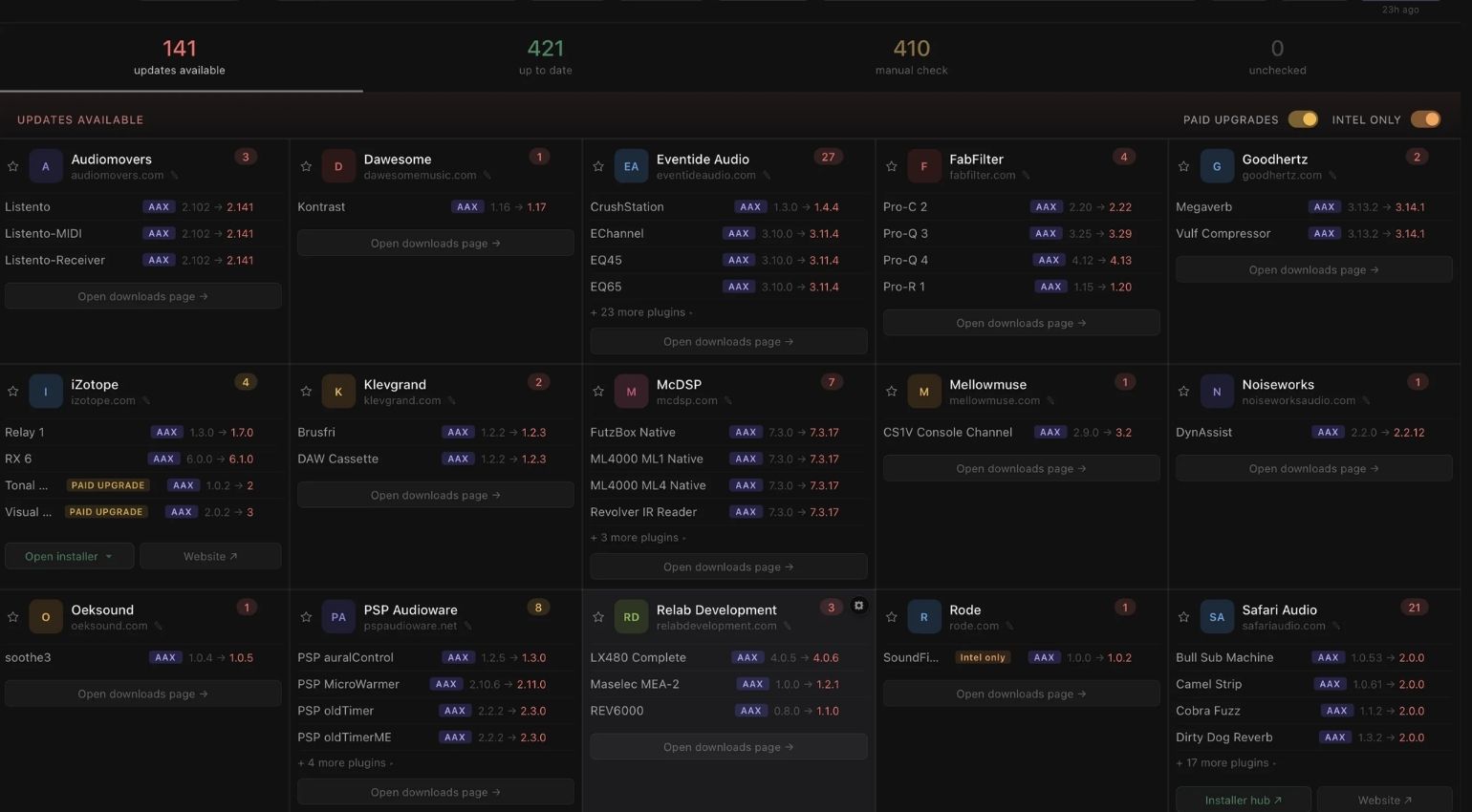
Swiss Army Knife Tools for Music Production 2026: The Underrated Helpers Hiding in Plain Sight · Source: PluginHub

Buying plugins is easy. Most producers have figured out the right compressor for the drum bus, the best limiter, and the go-to EQ. However, there’s a whole other category of software that almost nobody talks about: tools that don’t directly create music, but make everything around it noticeably faster and less painful. Swiss Army Knife Tool for music production aren’t plugins in the traditional sense. They run in the background, prevent chaos, save time, and help you stay focused on what matters most: the music. This article covers six of these Swiss Army Knife Tool and provides a practical tip for using each one in your day-to-day studio workflow.
Swiss Army Knife Tools for Music Production at a Glance
Everything you need to know about plugin managers, sample browsers, analysis tools, workflow helpers, and mobile production utilities to make swiss army knife tools for music production actually change the way you work.
- Most producers waste time every day on tasks that better-organized tools handle in seconds
- Plugin management, sample browsing, and loudness analysis are the three biggest time sinks in the home studio
- Every tool on this list is either free or a one-time purchase. No subscriptions.
- Many of these swiss army knife tools for music production are DAW-agnostic and work regardless of whether you’re in Ableton, Logic, or FL Studio
- Ableton users get an unfair advantage with No Work On Monday compared to producers who don’t know about it
- Tuva solves a problem every producer has and most people ignore: sample chaos
- Producer Tools is the only tool on this list that works when your computer is off
Swiss Army Knife Tools for Music Production: Plugin Managers, Sample Browsers, Metering, and Workflow Helpers Compared
PluginHub: Finally Getting Your Plugins Under Control – an Excellent Swiss Army Knife Tool
Anyone who’s been collecting plugins for a few years knows the problem. At some point you’ve got licenses across ten different vendors, installers from five different platforms, and any clear picture of which plugins are installed and activated on which machine is long gone. PluginHub is one of the very few applications that actually addresses this problem head-on.
PluginHub scans all installed plugin on your system, regardless of format (VST2, VST3, AU, or AAX), and displays them in a unified overview. If you work across a laptop and a studio machine, or occasionally on a different system, you know the scenario: you open a session, and half the plugins are flagged as missing. With PluginHub, you can check for this issue before switching systems.
What makes it especially useful is that it doesn’t just show you which plugins are installed; it also shows you which version is active and whether newer versions are available. Nice! That may sound like a small thing, but it actually saves a lot of time. If you’ve ever spent an hour clicking through Native Access, Softube Central, iLok License Manager, Waves Central, and your Plugin Alliance account just to figure out what needs updating, you’ll immediately understand its value.
Practical tip: Make a weekly PluginHub check part of your routine, ideally at the start of a production week. You see at a glance what needs updating, which licenses are expiring, and whether your second machine is in sync. Three minutes, no panicked plugin scan in the middle of a session.
PluginHub is available for macOS and Windows. The base version with three included scans is free. Extended features are available through the Pro version at $29.99.
No Work On Monday: The Unfair Advantage for Ableton Users
If you use Ableton Live, you know the feeling: the DAW can do an incredible amount, but a lot of that functionality is buried deep, poorly documented, or just not intuitive to find. No Work On Monday is a collection of Ableton-specific tools, racks, Max for Live devices, and genuinely well-made short video tutorials that solve exactly that problem. No Work On Monday Joe turns his whole website into a real swiss army knife tool for music production.
TThe philosophy is simple: spend less time fighting the DAW and more time making music. No Work On Monday provides ready-made workflow solutions for common Ableton user challenges. These solutions include routing setups, smart macro mappings, and performance-optimized live sets that you can drop into your session and customize.
What I appreciate most is that the accompanying helper videos don’t just show you how a tool works; they also explain why it’s built the way it is. That’s the difference between blindly using something and actually understanding it. Once you understand what’s happening inside a clever routing rack, you can build the next one yourself.
Practical tip: Begin with the basic racks before moving on to the more complex sets. The Session View workflow and performance templates are a good place to start. Load a template, watch the video, and modify the template to fit your workflow. After three iterations, you’ll have a setup that actually fits your workflow.
No Work On Monday is Ableton Live only and not useful for Logic or FL Studio users. But if you’re in Ableton, at least check out the free intro. The full devices package runs $39.
Noir Labs Swiss Army Meter: The Analysis Device That Actually Does Everything — a Perfect Swiss Army Knife Tool for Music Production
The name says it all. The Noir Labs Swiss Army Meter 6 is a Max for Live analysis device that combines several specialized metering tools into one interface: LUFS loudness measurement, true peak display, spectrum analyzer, stereo correlation, goniometer, and phase meter. All in a single instance that drops onto any channel or your mix bus. Important: this one is Ableton Live only.
What sets it apart from other metering plugins is the density of information packed into a genuinely readable layout. If you’ve ever had four different analyzer plugins open simultaneously just to keep tabs on loudness, stereo width, frequency response, and phase at the same time, you know how much CPU and screen space that costs. Swiss Army Meter puts it all in one compact view.
The device is especially valuable in mastering workflows and during referencing. If you read our Loudness War 2026article, you already know how important LUFS-accurate metering is for getting streaming-ready masters right. Swiss Army Meter delivers that information in real time without having to open dedicated mastering software.
Practical tip: Leave the Swiss Army Meter permanently on your mix bus and let it run throughout your entire mixing session. Don’t use it as something you’re actively consulting the whole time; use it as a passive monitor that you occasionally glance at. This will help you develop a feel for where your mixes typically land in terms of loudness and stereo width. You will also catch problems earlier because you have a visual reference running at all times. It’s a small habit with a big payoff.
Noir Labs offers Swiss Army Meter as a one-time purchase at $10. No subscription. Runs as a Max for Live device in Ableton Live on macOS and Windows.
Tuva: The End of Sample Chaos
Anyone who’s been collecting samples for years eventually hits a problem that sneaks up slowly: folders spread across multiple drives, sample packs from ten different sources, field recordings buried somewhere in the documents structure, and a DAW browser that finds files but doesn’t auto-tag or search intelligently. Tuva is the direct answer to that problem.
Tuva is a standalone desktop app, not a plugin or a DAW add-on. It scans your specified folders and analyzes every audio file using on-device machine learning, so an internet connection is not required. It automatically tags everything by instrument type, tempo, and category. There are sixty-six categories available. For example, a field recording of a metal surface would be tagged as percussion. A synth sweep is categorized as a synth stab. It just works.
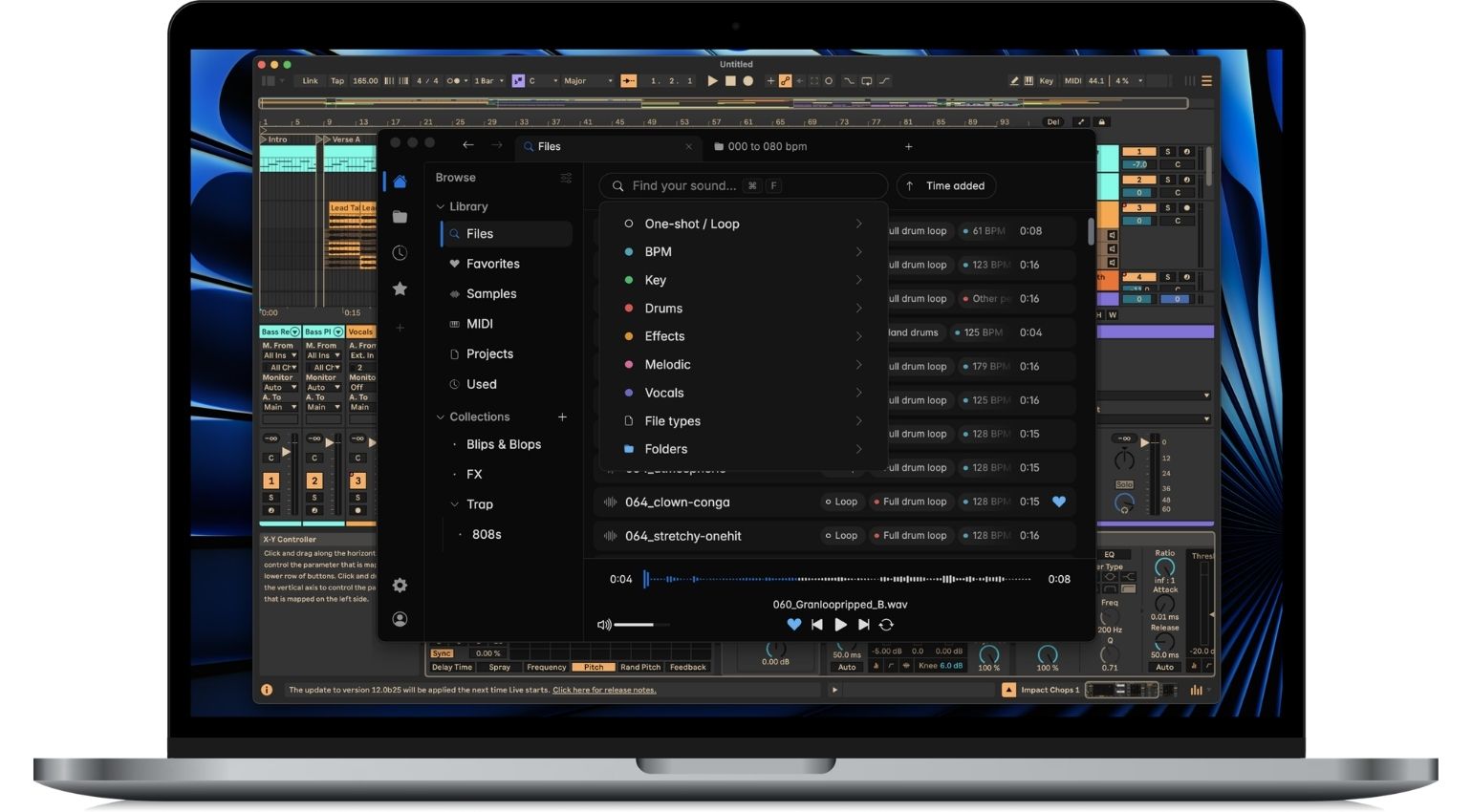
What makes version 1.5 especially compelling? Tuva can now browse and play back audio and MIDI directly from DAW project files in Ableton Live, Logic Pro, FL Studio, Reaper, and Cubase without opening the DAW. If you’re looking for a sample from an old session, you don’t need to load the entire project. You can navigate to it in Tuva and preview the material right there.
Practical tip: Allow Tuva time to scan your entire sample library when you first launch it. Depending on the size of your library, this process may take a while, but it’s a one-time investment. After that, consistently use the search and filter functions. The similarity search is particularly useful. Click a sample, and Tuva will show you everything in your library that sounds similar. This feature can genuinely boost your creativity because you can rediscover sounds you forgot you had.
Tuva costs €25 as a lifetime license, with a 14-day free trial. Available for macOS and Windows.
Youlean Loudness Meter: The Best Free Analysis Companion as a Swiss Army Knife Tool
Youlean Loudness Meter is one of the few tools that’s made it into the plugin browser favorites of most professional mastering engineers, and the base version is completely free. The plugin measures LUFS integrated, short-term, and momentary, displays true peak, and visualizes the loudness history over time as a curve. Exactly what you need when mastering for different streaming platforms.
What sets Youlean apart from other free metering plugins is its precision and visual presentation. The display is clean, the values are reliable, and the ability to set platform-specific target values directly in the interface significantly speeds up the daily mastering check. The Spotify, Apple Music, and YouTube targets are all visible at once.
I regularly use the Youlean Loudness Meter alongside other mastering tools because its visualization of the loudness curve over time provides information that a static meter value cannot. You can see exactly where the dynamics of a track drop off, where a drop loses too much volume, and where a chorus might dominate too heavily.
Practical tip: Use it to measure your mix against a reference track. Load the reference track onto a separate DAW track and switch back and forth between the two to see how the LUFS curve differs. This is referencing on a new level because you can see where the difference is, not just hear it. It’s also worth knowing that you can drag and drop a track directly onto the GUI for instant analysis. Sweet!
Youlean Loudness Meter is free as VST, AU, and AAX for macOS and Windows. A Pro version with extended features is available as an optional paid upgrade. This is definitely one of the most important tools in my Swiss Army Knife.
Producer Tools App: The Swiss Army Knife Tool for on the Go
This is the only tool on this whole swiss army knife tools list that runs on your phone, and it’s one of the most useful. Producer Tools is an app for iOS and Android that bundles a collection of utilities you need constantly in the studio but can’t find natively inside any DAW. A desktop version is reportedly coming soon.
The delay calculator converts BPM-synced delay times into milliseconds for each note value. The frequency-to-note translator shows you the corresponding pitch of a specific frequency, which is invaluable for targeted EQ adjustments. The chord finder displays all the notes in a given chord. The harmonic mixing wheel helps you find compatible keys for DJ sets and productions. The EQ guide provides a quick overview of the characteristic frequency ranges for different instruments.
None of this is rocket science, but it all comes up constantly in practice. The real advantage over a quick Google search is that the app works offline, loads in seconds, and provides a reliable answer without forcing you to dismiss three ad overlays first. That’s exactly how studio tools should work!
Practical tip: Use the delay calculator for sound design as well as mixing. When you put an LFO on a filter and want it to be rhythmically synced to the track, the calculator immediately gives you the correct rate in hertz. It’s faster than any DAW-internal calculation and prevents the trial and error that usually results in an inaccurate value.
Producer Tools is free in a base version, with a paid Pro upgrade for extended features. Available for iOS and Android.
Conclusion: Small Tools, Big Impact — My Swiss Army Knife Tools for Music Production
The six Swiss Army Knife Tools for music production featured in this article have one thing in common: they solve real problems that arise daily in the studio without any friction. There’s no complicated onboarding process, no steep learning curve, and no monthly subscription just to access the basics.
But: the best workflow helper is the one you actually use. Instead of installing all of these Swiss Army Knife Tools at once, try using one or two of them in your next session. If something hasn’t found its way into your daily routine after a week, remove it. What stays stays for good.
What Swiss Army Knife Tools for music production do you think are missing from this list? Let us know in the comments.
More on Swiss Army Knife Tools for Music Production
- Loudness War 2026
- Monitoring Setup for Electronic Music Producers
- Analog vs. Digital in the Home Studio
- PluginHub
- No Work On Monday
- Noir Labs Swiss Army Meter
- Tuva Sample Manager
- Youlean Loudness Meter
- Producer Tools App

This might also interest you

One response to “Swiss Army Knife Tools for Music Production 2026: The Underrated Helpers Hiding in Plain Sight”
I wish there was an app that could tell me if a plugin had ever been used in a Logic Pro project so I wouldn’t have the issue of loading an old project only to find it needs a plugin I have since deleted.