Remix in the Box: 3 Tools for Modern Remixing – Perfect Match
Three Practical Tools for Creating Remixes

 5,0 / 5,0 |

Remix in the Box: We take a look at three tools that will turn you into a remix master using only your computer. These tools allow you to put music in a whole new context. They’re a perfect match for DJs, producers, and bands alike.
Remix in the Box – Perfect Match
Remix in the Box
These days, remixing is much more than just an extended intro or a new beat under “old” tracks. With an exciting reworking, you can reshape a song or place it in an entirely new context. It doesn’t have to be about redesigning music for the dance floor, although that is often the goal.
Thanks to today’s technology, breaking music down into its components, editing them, and reassembling them is no big deal. You can do it all on your computer. All you need are the right tools. We’d like to introduce you to three of them. In our opinion, these tools complement each other and are a perfect match.
Ableton Live – the Creative Control Center to Remix in the Box
Ableton Live has been a staple in the remixing world for years. Even beginners can use this DAW to place songs or individual audio clips on the grid with perfect timing after a short learning curve. They can also take everything in a completely new direction with slices and warps.
In particular, Session View invites you to rearrange existing material, swap loops, and experiment with different song structures without committing to anything right away. You can flexibly combine, warp, or rearrange individual stems or entire stereo tracks.
This makes remixing feel natural and creative. Rather than working linearly and perhaps getting stuck, you can develop your remix from many small ideas that are brought together later. Ableton Live provides the perfect framework for this process and has many integrated sound generators and effects, such as Beat Repeat, that support your creative flow.
Since the release of Ableton Live 12.3, the DAW has offered the option of splitting entire songs into stems, i.e., isolated tracks such as vocals, drums, bass, and others. This is a great way to create new remixes. If you only have the finished mixed version of your song and want to create a new mix, stem splitting can work wonders.
Ableton Live is therefore ideal for producing remixes on your computer. You can purchase the DAW here at Thomann*.


Serato Sample for Creative Slices, Stem Creation, and High-quality Time Stretching
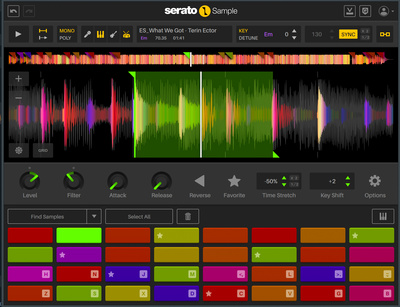
Serato Sample is one of the most user-friendly sampling tools for remixes. The plugin automatically analyzes audio material using the “Find Samples” function, recognizing transients and tonal components. This allows you to break down vocals, hooks, or melodic fragments into playable parts in no time. This is invaluable when working on a remix, and with the random mode, Serato Sample automatically creates new combinations, essentially remixing at the touch of a button!
The combination of excellent-sounding time stretching and pitch shifting (called “Pitch-n-Time” here) is particularly helpful for remixing because it remains musical even with heavy intervention. With it, a vocal hook can be reharmonized, rhythmically rebuilt, or played completely differently without complicated preparation.
Another bonus of Serato Sample is the now integrated stem splitting, which makes the plugin a great alternative to stem separation in Ableton Live. Given that the manufacturer has its roots in the DJ sector, it’s no surprise that this plugin offers such intuitive access. Get Serato Sample here at Thomann*.

Synchro Arts RePitch 2: Full Control Over Pitch and Timing and to Remix in the Box
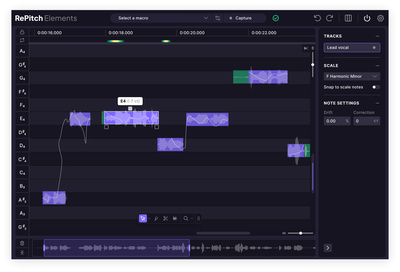
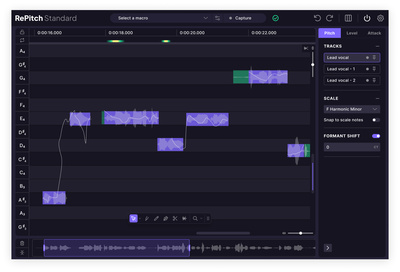
For a remix to really work, the vocals must be perfect. Synchro Arts RePitch 2 is a precise tool that provides comprehensive options for editing pitch and timing. Unlike many auto-tune effects, RePitch 2 is less about achieving a specific sound and more about providing precise control and adjustment.
This is crucial for creating a remix. With RePitch 2, you can cleanly adapt vocals to new harmonies, place them more tightly or loosely in rhythm, and shape them in a targeted manner without losing their character. Synchro Arts RePitch 2 ensures the voice fits organically into the new arrangement, even if the reworking deviates significantly from the original.
Synchro Arts RePitch 2 is available in two editions at Thomann*. For most tasks, the affordable Elements version is all you need. RePitch 2 Standard offers additional professional features, such as multitrack editing, formant shifting, shaper and split tools, and the Warp Points tool for detailed timing adjustments.

Conclusion: Why this Trio is a Perfect Match
Ableton Live, Serato Sample, and Synchro Arts RePitch 2 complement each other perfectly for creating a computer-based remix because they cover different phases of the process. Ableton Live forms the foundation and “workspace” for remixing. Serato Sample is ideal for creatively dismantling and reinterpreting material. RePitch ensures precision when editing vocals. Together, they are the perfect trio!
More Information – Remix in the Box
- Stem Separation Software for Music Production
- zplane Peel Stems: Real-time Stem Separation in your DAW
- Introducing Serato Stems, a ground-breaking new DJ performance tool
- More from Perfect Match
* Note: This article contains affiliate links that help us finance our site. Don’t worry: the price for you remains the same! If you buy something through these links, we receive a small commission. Thank you for your support!


This might also interest you
One response to “Remix in the Box: 3 Tools for Modern Remixing – Perfect Match”

“new beat under “old” tracks”, can you tell that to the kindergarten bunch that thinks they’re making something completely new by calling it hard “techno” nowadays?